Digital Business Cards: A Practical Guide for Small Businesses

A digital business card is a mobile-first web page that gathers the information and actions a new contact needs in one link. It can include calling, WhatsApp, directions and contact saving alongside a gallery, reviews, opening hours and a lead form. Unlike printed cards, it does not run out and the same URL can be updated whenever your business changes.
What a digital business card actually is
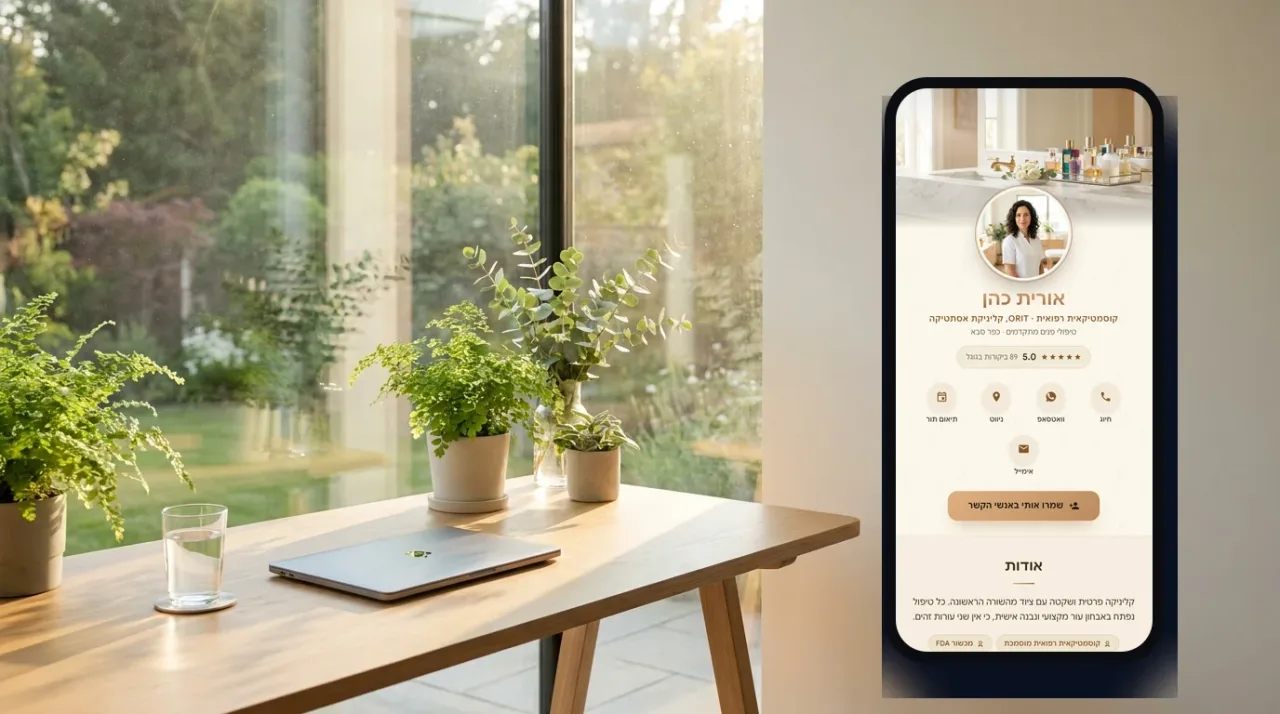
Think of it as the shortest useful version of your business online. It opens in any modern browser, requires no installation and is designed for the moment immediately after someone discovers or meets you. A strong card answers who you are, what you offer, why the visitor should trust you and what to do next.
How it differs from a printed card
- It stays current: one dashboard update changes the page behind every previously shared link and QR code.
- Actions are clickable: visitors can call, message, navigate or save your contact directly.
- It carries proof: images, reviews, services and videos can support the promise on the card.
- It can be measured: views, button taps and submitted leads reveal whether people act.
Seven elements an effective card should include
- A recognizable name, business name and professional title.
- A clear portrait, logo or hero image.
- A short sentence explaining the result you provide.
- The three to five contact actions customers use most.
- Selected services or work samples rather than an exhaustive catalogue.
- Trust signals such as reviews, credentials or ratings.
- A simple lead form for visitors who are not ready to call immediately.
How to share it: link, WhatsApp and QR

Send the URL in WhatsApp or email, place it in social profiles and add its QR code to printed material. An optional NFC card can open the same page with a tap, but it is another entry point rather than a replacement for the link and QR code.
More on SimplyCard: the physical NFC card, solutions for companies and teams, and the FAQ.
See what your card could look like
SimplyCard includes contact buttons, galleries, reviews, opening hours, leads and a personal QR code from the start.
Build your cardBy signing up or logging in you agree to the Terms of Service and the Privacy Policy.
What does a digital business card cost?
Pricing usually follows one of two models. A managed service charges for setup and may charge again for edits. A self-service platform charges a predictable subscription and lets the owner update the card directly. Compare the total first-year cost, but also check who controls the URL and what happens to your content if you cancel.
Four checks before choosing a platform
- Can you update every important field yourself?
- Does the card remain fast, accessible and easy to use on mobile?
- Are lead management, analytics and QR creation included in the listed price?
- Are cancellation terms and the fate of your content explained clearly?
From an empty account to a useful first version
Prepare your business title, one strong image, main contact details and a short list of services. Choose a suitable design, place the most important action first, preview on a phone and test every button. Publish only after another person can understand the business and contact you without explanation.
Frequently asked questions
Does a digital business card replace a website?
For a small service business that mainly needs calls, work samples and enquiries, it can be enough at the beginning. A full website becomes useful for extensive content and search traffic, while the card remains the faster introduction tool.
Is a digital card the same as a landing page?
A landing page usually supports one campaign and offer. A digital card is a lasting identity and contact page used across channels, although a good card also contains a clear call to action and lead form.
Do visitors need to install an app?
No. The card opens in the phone browser from a link, QR code or NFC tap. There is no installation, registration or visitor account.
How much does SimplyCard cost?
SimplyCard costs ₪39 per month or ₪399 per year. Building and previewing are free; payment is required when you choose to publish.
The SimplyCard team
Digital business card specialists
We build SimplyCard, a simple way for small businesses to create a professional digital business card. We write about first impressions, practical marketing and turning introductions into customer enquiries.