Design a Professional Digital Business Card Yourself

Most people assume that designing a card requires artistic talent. The real difficulty is the number of decisions: color, type, image, wording and order. A structured template removes most of those decisions. The remaining job is to select clear content and apply a few consistent rules.
First rule: make fewer decisions
Start from a layout designed for business information rather than a blank canvas. Keep the existing spacing and hierarchy until there is a clear reason to change them. Consistency usually looks more professional than adding more decorative elements.
Color: one dominant color and one accent

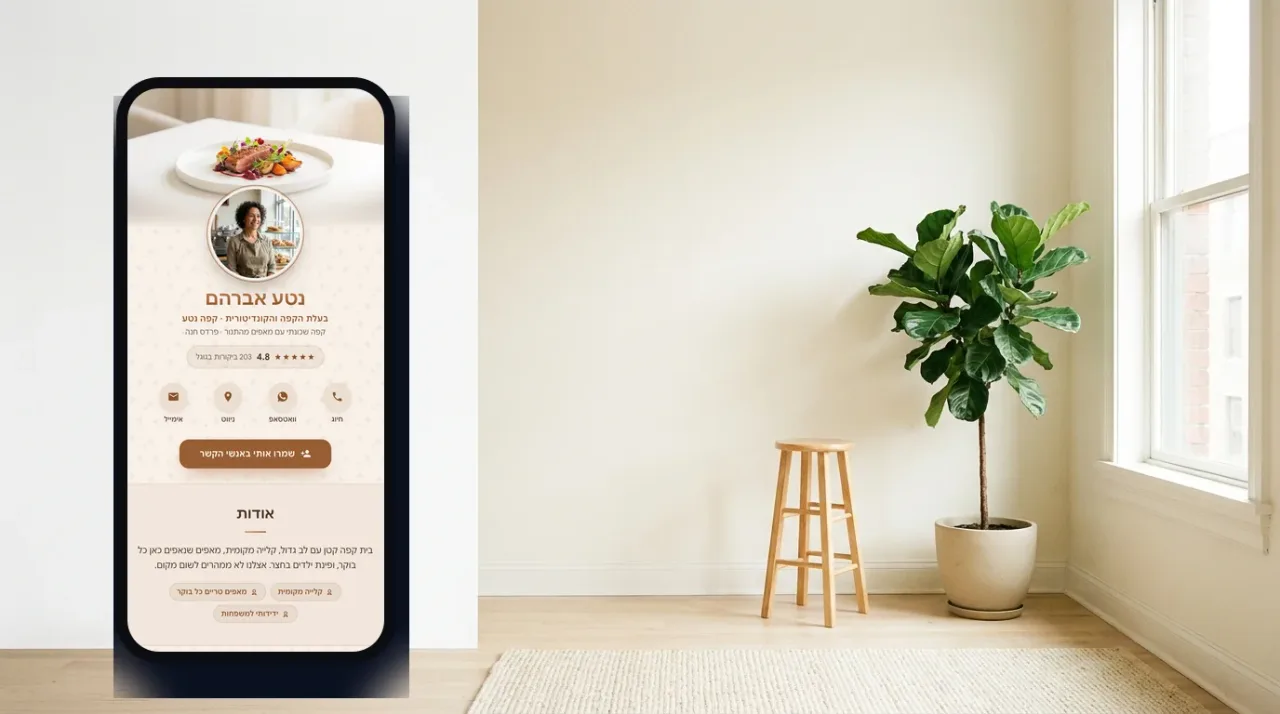
Choose a dominant brand color for large surfaces and one accent for important actions. Use neutral text and backgrounds everywhere else. Test text contrast, and never rely on color alone to explain whether a button is active or important.
Typography: one readable family
Use one type family with two or three weights. Make the name and section headings visibly larger, keep paragraphs comfortably readable and avoid all-uppercase text for long labels. A mobile preview is the real test, not how the editor looks on a large monitor.
One strong image beats ten average ones
Use a sharp, well-lit portrait or a representative image of your work. Crop deliberately and remove photographs that do not add new evidence. A short gallery should feel selected, not like an unedited camera roll.
More on SimplyCard: the physical NFC card, solutions for companies and teams, and the FAQ.
Or let the template make the first decisions
Choose your field in SimplyCard and start with a coordinated palette, typography and structure. Replace the text and images while watching every change in a live preview.
Start designingBy signing up or logging in you agree to the Terms of Service and the Privacy Policy.
The unpopular truth: content matters more than decoration
A visitor needs a specific professional title, a plain-language description of the result you provide and an obvious next action. Replace vague slogans with useful information. Put the action customers use most near the top and move supporting detail lower down.
Final checks before publishing
- Open the preview on a real phone and read it in normal lighting.
- Tap every call, WhatsApp, email, navigation and social link.
- Check spelling, business hours and international phone formatting.
- Confirm that important text meets the background with strong contrast.
- Ask someone unfamiliar with the business what you do and how they would contact you.
Frequently asked questions
Can I get a good result with no design experience?
Yes. Work from a structured template instead of a blank canvas. The template already solves layout, spacing and scale, leaving you to replace content and images.
How long does it take to design a digital card?
A publishable first version often takes 15 to 30 minutes when your text and images are ready. Deciding what to say usually takes longer than operating the editor.
Should I copy a competitor design I like?
Study its structure, not its identity. Notice the order, amount of text and primary action, then use your own brand color, language and images.
Is it better to design it myself or hire a designer?
Hire a designer when an established brand system must be reproduced precisely or when you prefer to delegate the work. For many small businesses, a guided editor produces a strong result and preserves the ability to update it independently.
The SimplyCard team
Digital business card specialists
We build SimplyCard, a simple way for small businesses to create a professional digital business card. We write about first impressions, practical marketing and turning introductions into customer enquiries.